En seguimiento a la solicitud en el comentario del artículo redactamos el siguiente artículo.
El Script solicitado es para Exportar Información tal como Remitente, Fecha, Asunto, Mensaje. Para de los correos recibidos en Outlook a Excel automáticamente cuando llegan y también poder utilizar con reglas para configurar ciertos remitentes y asunto. El script guarda en el registro de Windows el numero consecutivo de renglón para que no se pierda la secuencia al momento de cerrar Outlook o reiniciar nuestro equipo.
Instrucciones de Uso
1.- Abrir el editor de Visual Basic (ALT+F11).
2.- Insertar un modulo nuevo (Insert > Module).
3.- Copiar el código VBScript.
4.- Debemos crear un documento Excel el cual guardaremos en una ruta de fácil acceso para el ejemplo creamos un folder en C:1-Teststest.xlsx, el cual dentro del folder 1-Tests tenemos nuestras pruebas y el archivo llamado test.xlsx es el documento Excel que creamos. Estos datos los especificamos en la linea 30 del código.
5.- En el documento Excel debemos dar un nombre a la hoja en este caso la nombramos Test. Este dato lo especificamos en la linea 41 del código.
6.- Podemos dar formato al documento y poner los encabezados como en la imagen, el código esta configurado para que se salte el primer renglón.
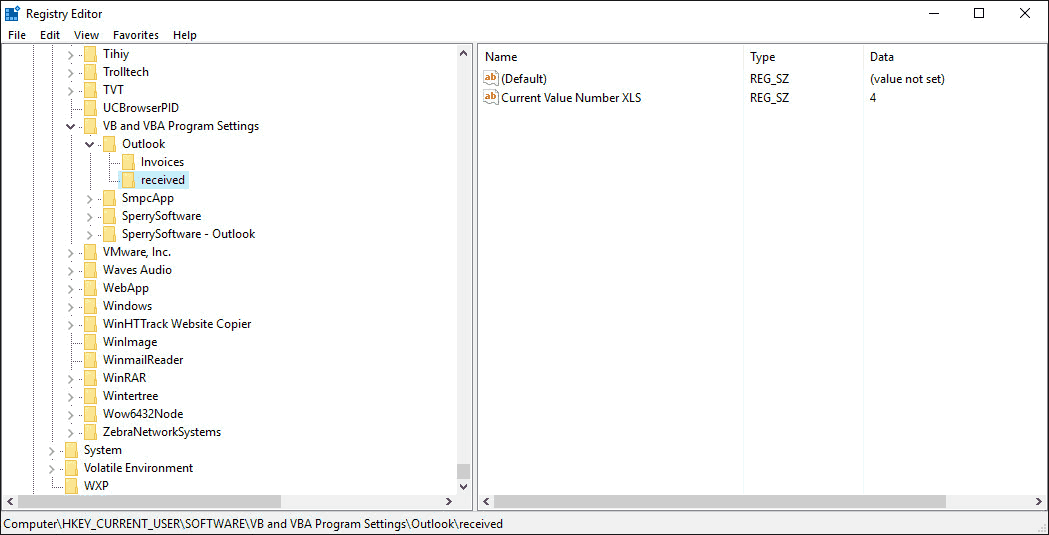
 7.- El registro del valor numérico del renglón consecutivo disponible se guarda en la ruta: HKEY_CURRENT_USERSOFTWAREVB and VBA Program SettingsOutlookreceived el cual si deseamos reinicializarlo debemos entrar a la ruta anterior y modificar (Tambien podemos eliminar) la llave Current Value Number XLS por el numero 2.
8.- Configuramos la regla requerida para ejecutar el Script.
Para mas información de configuración ver: Como utilizar el Editor VBA en Office (Utilizar Macros VBScript) y Outlook – Crear y configurar reglas
Código
Option Explicit
Public Sub CopyEmailToExcelWhenArrive(olItem As Outlook.MailItem)
 Dim xlApp As Object
 Dim xlWB As Object
 Dim xlSheet As Object
 Dim rCount As Long
 Dim bXStarted As Boolean
 Dim enviro As String
 Dim strPath As String
 Dim iDefault As Long
'Declare registry
 Dim sKey As String
 Dim lRegValue As Long
 Dim sAppName As String
 Dim sSection As String
'Set name of registry keys
 sAppName = "Outlook"
 sSection = "received"
 sKey = "Current Value Number XLS"
 iDefault = 2
 lRegValue = GetSetting(sAppName, sSection, sKey, iDefault)

 Dim currentExplorer As Explorer
 Dim Selection As Selection
 Dim obj As Object
 Dim strColB, strColC, strColD, strColE, strColF, strColG As String

' Get Excel set up
'the path of the workbook
 strPath = "C:1-Teststest.xlsx"
     On Error Resume Next
     Set xlApp = GetObject(, "Excel.Application")
     If Err <> 0 Then
         Application.StatusBar = "Please wait while Excel source is opened ... "
         Set xlApp = CreateObject("Excel.Application")
         bXStarted = True
     End If
     On Error GoTo 0
     'Open the workbook to input the data
     Set xlWB = xlApp.Workbooks.Open(strPath)
     Set xlSheet = xlWB.Sheets("Test")
    ' Process the message record

    On Error Resume Next

 'collect the fields
     strColB = olItem.senderName
     strColC = olItem.SenderEmailAddress
     strColD = olItem.Subject
     strColE = olItem.Body
     strColF = olItem.To
     strColG = olItem.ReceivedTime


'write them in the excel sheet
  xlSheet.Range("B" & lRegValue) = strColB
  xlSheet.Range("c" & lRegValue) = strColC
  xlSheet.Range("d" & lRegValue) = strColD
  xlSheet.Range("e" & lRegValue) = strColE
  xlSheet.Range("f" & lRegValue) = strColF
  xlSheet.Range("g" & lRegValue) = strColG

'Save registry row increment
 SaveSetting sAppName, sSection, sKey, lRegValue + 1

     xlWB.Close 1
     If bXStarted Then
         xlApp.Quit
     End If

     Set olItem = Nothing
     Set obj = Nothing
     Set currentExplorer = Nothing
     Set xlApp = Nothing
     Set xlWB = Nothing
     Set xlSheet = Nothing
 End Sub
Basado un codigo de Diane Poremsky publicado en slipstick
Codigo anterior modificado para no utilizar registro
Código exportar información de los correos en la carpeta seleccionada de Outlook a Excel de forma horizontal
El siguiente código exporta la información de la carpeta seleccionada o selección de correos de forma horizontal, ver imagen de ejemplo:

Instrucciones de Uso
1.- Abrir el editor de Visual Basic (ALT+F11).
2.- Insertar un modulo nuevo (Insert > Module).
3.- Copiar el código VBScript.
4.- Debemos crear un documento Excel el cual guardaremos en una ruta de fácil acceso para el ejemplo creamos un folder en C:1-Teststest.xlsx, el cual dentro del folder 1-Tests tenemos nuestras pruebas y el archivo llamado test.xlsx es el documento Excel que creamos. Estos datos los especificamos en la linea 35 del código.
5.- En el documento Excel debemos dar un nombre a la hoja o dejar la predeterminada Sheet1. Este dato lo especificamos en la linea 47 del código.
Para mas información de configuración ver: Como utilizar el Editor VBA en Office (Utilizar Macros VBScript) y Outlook – Crear y configurar reglas
Option Explicit
Option Explicit
Public Sub CopyEmailToExcelWhenArrive() 'olItem As Outlook.MailItem)
 Dim olItem As Outlook.MailItem
 Dim xlApp As Object
 Dim xlWB As Object
 Dim xlSheet As Object
 Dim rCount As Long
 Dim bXStarted As Boolean
 Dim enviro As String
 Dim strPath As String
 Dim iDefault As Long

'Bloque Registro Declarar Registro - Se puede eliminar si no se utiliza
 Dim sKey As String
 Dim lRegValue As Long
 Dim sAppName As String
 Dim sSection As String
'Dar nombre a las llaves de registro - Se puede eliminar si no se utiliza
 sAppName = "Outlook"
 sSection = "received"
 sKey = "Current Value Number XLS"
 iDefault = 2
 lRegValue = GetSetting(sAppName, sSection, sKey, iDefault)

'Fin Bloque Registro

 Dim currentExplorer As Explorer
 Dim Selection As Selection
 Dim objOL As Outlook.Application
 Dim objFolder As Outlook.MAPIFolder
 Dim objItems As Outlook.Items
 Dim obj As Object

 Dim strColB, strColC, strColD, strColE, strColF, strColG As String

'Iniciar Excel
'Ruta del Excel
 strPath = "C:1-Teststest.xlsx"
     On Error Resume Next
     Set xlApp = GetObject(, "Excel.Application")
     If Err <> 0 Then
         Application.StatusBar = "Please wait while Excel source is opened ... "
         Set xlApp = CreateObject("Excel.Application")
         bXStarted = True
     End If
     On Error GoTo 0
     'Abre la hoja de calculo
     Set xlWB = xlApp.Workbooks.Open(strPath)
     'Especificar nombre de hoja de calculo
     Set xlSheet = xlWB.Sheets("Sheet1")
     'Lee el ultimo registro de la hoja de calculo
     lRegValue = xlSheet.Range("B" & xlSheet.Rows.Count).End(-4162).Row
     ' Requerido para Outlook 2016 -  si genera espacios en blanco
     lRegValue = lRegValue + 1

    On Error Resume Next

    'Bloque para leer folder actual- se puede remover si no se utiliza
    Set objOL = Outlook.Application

    Set objFolder = objOL.ActiveExplorer.CurrentFolder
    Set objItems = objFolder.Items
    For Each obj In objItems

    Set olItem = obj

 'Recolecta los datos
     strColB = olItem.SenderName
     strColC = olItem.SenderEmailAddress
     strColD = olItem.Subject
     strColE = olItem.Body
     strColF = olItem.To
     strColG = olItem.ReceivedTime

' Obtener las direcciones Exchange - Se puede remover si no se utiliza Exchange
 Dim olEU As Outlook.ExchangeUser
 Dim oEDL As Outlook.ExchangeDistributionList
 Dim recip As Outlook.Recipient
 Set recip = Application.Session.CreateRecipient(strColB)

 If InStr(1, strColC, "/") > 0 Then
     Select Case recip.AddressEntry.AddressEntryUserType
       Case OlAddressEntryUserType.olExchangeUserAddressEntry
         Set olEU = recip.AddressEntry.GetExchangeUser
         If Not (olEU Is Nothing) Then
             strColC = olEU.PrimarySmtpAddress
         End If
       Case OlAddressEntryUserType.olOutlookContactAddressEntry
         Set olEU = recip.AddressEntry.GetExchangeUser
         If Not (olEU Is Nothing) Then
            strColC = olEU.PrimarySmtpAddress
         End If
       Case OlAddressEntryUserType.olExchangeDistributionListAddressEntry
         Set oEDL = recip.AddressEntry.GetExchangeDistributionList
         If Not (oEDL Is Nothing) Then
            strColC = olEU.PrimarySmtpAddress
         End If
     End Select
End If
'Finaliza Seccion de Exchange

'Escribe valores en hoja de calculo
  xlSheet.Range("A" & lRegValue) = "Sender Name"
  xlSheet.Range("B" & lRegValue) = strColB
  lRegValue = lRegValue + 1
  xlSheet.Range("A" & lRegValue) = "Sender Email"
  xlSheet.Range("B" & lRegValue) = strColC
  lRegValue = lRegValue + 1
  xlSheet.Range("A" & lRegValue) = "Subject"
  xlSheet.Range("B" & lRegValue) = strColD
  lRegValue = lRegValue + 1
  xlSheet.Range("A" & lRegValue) = "Body"
  xlSheet.Range("B" & lRegValue) = strColE
  lRegValue = lRegValue + 1
  xlSheet.Range("A" & lRegValue) = "To"
  xlSheet.Range("B" & lRegValue) = strColF
  lRegValue = lRegValue + 1
  xlSheet.Range("A" & lRegValue) = "Received Time"
  xlSheet.Range("B" & lRegValue) = strColG
  lRegValue = lRegValue + 2

  'Si no se lee folder actual remover
  Next

'Guarda el registro - Si se utiliza registro remover el '
 'SaveSetting sAppName, sSection, sKey, lRegValue + 1

     xlWB.Close 1
     If bXStarted Then
         xlApp.Quit
     End If

     Set olItem = Nothing
     Set obj = Nothing
     Set currentExplorer = Nothing
     Set xlApp = Nothing
     Set xlWB = Nothing
     Set xlSheet = Nothing
 End Sub
Modificación basada en un codigo de Diane Poremsky publicado en slipstick